
Lab information
BioSemi
Practical information for SCCN members and visitors: computing, experiments, and equipment.
Introduction
BioSemi is the EEG signal acquisition device used at SCCN. The time it takes for a BioSemi amplifier to send its data to a computer program that timestamps each sample using labstreaminglayer was measured by Matthew Grivich using a National Instruments data acquisition device (
Experimental Procedure
In order to verify these results, we use the same procedure. The NIdaq program used to generate the signal and the markers can be downloaded here. The program and the device patch is setup to:
- generate 200ms pulses of 200mv every second out of the NIdaq output
- feed the voltage signal back into the NIdaq input
- feed the same signal into BioSemi
- send an LSL marker when the signal (in software) goes above 100mv
- find the time at which the BioSemi signal goes above 100mv
- compare the two markers -- their difference is the latency of BioSemi
Results
Previously, (using the same procedure) it was determined that the latency of BioSemi was 7.72ms. The more recent experiments find a very similar, but not exactly the same, value but, only for the BioSemi Analog Input Box, and when collecting the EEG channel subset 'all'.
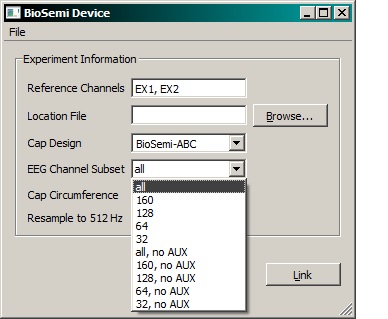
It turns out that this latency changes based on what subset of EEG inputs are used. The latency values are also slightly different, depending on whether or not the Analog Input Box (AIB), or the ActiveTwo Box (AD-Box)
Here you will find a table detailing the latency, standard deviation and jitter for each of the two boxes in each mode. Here is a spreadsheet in xlsx format. Discluding the AUX channels had minimal impact, so these values are not included. These boxes can also be daisy chained together (and this is often done in our lab) so in future I will provide results for more configurations. Please email me at dmedine@ucsd.edu if some configuration's latency needs be known immediately. Also coming soon is the same data when the App is the mode in which it downsamples to 512Hz.
IMPORTANT!!!
As of now (3/13/2015) the BioSemi App that is bundled with the LSL package automatically reduces its timestamps by 7.72ms. If you are unsure whether or not this happening, you can check by opening an xdf in XDFViewer and looking for the descriptor:
<desc> <synchronization>This means that 7.72ms will be subtracted from all the data timestamps by the Mobilab XDF loading procedure. This will change in future editions of BioSemi.exe to account for the different setups. You can always adjust this by hand simply by adding or subtracting the appropriate amount to the BioSemi data timestamps in your analysis code.
<offset_mean>0.00772</offset_mean>
</synchronization> </desc>
Finally, histograms and binned latency times are accumulated here.